Global Passport Photo Size Requirements – Complete Guide
Check official passport photo size requirements including height, width, pixel dimensions, file-size limits, background colors, and face guidelines. Ideal for passport, visa, OCI, and government ID applications.
Standard Passport Photo Requirements
Although dimensions vary between countries, most passport photos follow common global standards. A typical passport photo must show the applicant’s full face, neutral expression, light/white background, and must be free of shadows.
Key Guidelines
- Face should cover 70%–80% of the frame.
- Plain white or off-white background.
- No filters, heavy editing, or beautification effects.
- Photo must be recent (taken within last 6 months).
- High resolution, no blurred or pixelated images.
- Eyes open and clearly visible; no tinted glasses.
Examples
- Select a country or enter custom passport photo dimensions.
- Upload your photo in JPG/PNG format.
- The tool adjusts the size, DPI, and cropping to match required guidelines.
- Choose output format and max file size (KB).
- Download a compliant, ready-to-upload passport photo.
Sample Photo Requirements
The photograph should be in colour and of the size of 2 inch x 2 inch
(51 mm x 51 mm) and The digital size of file should not exceed 100 KB each and
must not be less than 20 KB. Minimum resolution of the file should be 350 pixels
(Width) X 350 pixels (Height) and maximum 1000 pixels (Width) X 1000 pixels
(Height). Bit Depth of image file should be 24 bit and DPI range should be
between 200 and 300.
The photo‐print should be clear and with a continuous‐tone quality.
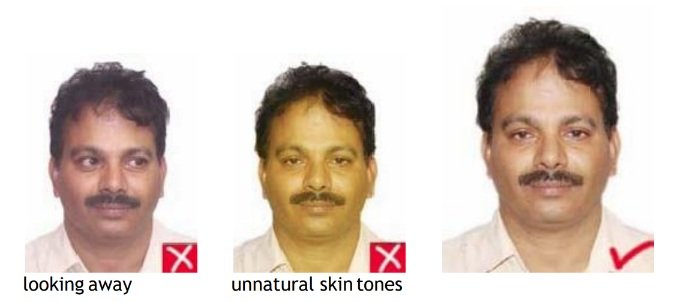
It should have full face, front view, eyes open.
Photo should present full head from top of hair to bottom of chin.
Center head within frame.
The background should be a plain white or off‐white.
There should not be any distracting shadows on the face or on the background.
Head coverings are not permitted except for religious reasons, but the facial
features from bottom of chin to top of forehead and both edges of the face must be
clearly shown.
The expression on the face should look natural.
Brightness and contrast should be adjusted to present the subject and background
accurately.
Photos without proper contrast or colour may obscure unique facial features.
Colour should reproduce natural skin tones.
Fluorescent or other lighting with unbalanced colour may cause unwanted colour
castin the photo. Appropriate filters can eliminate improper colour balance.
Head and Eyes - Position and Background
Head should face the camera directly and should not tilt or turned(portrait style).
Photo must show both edges of the face clearly.
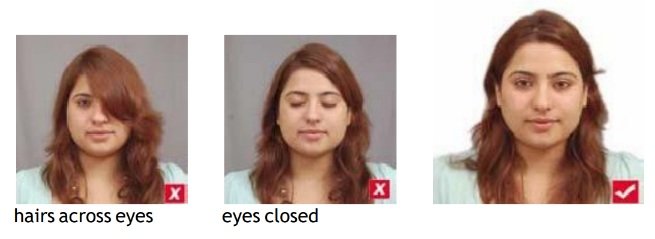
The eyes must be open, level and clearly visible and must not be covered by hairs
or eyeglass frames.
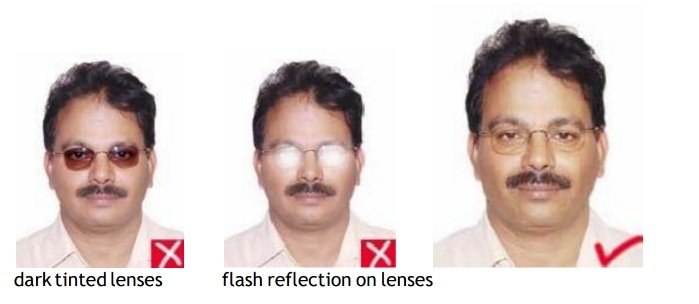
Glare on eyeglasses should be avoided with a slight upward or downward tilt of the
head.
No tinted or dark glasses.
Exposure and Lighting
There should not be any overexposure or under‐exposure which results in an
unusable photo.
There should be a three‐point balanced lighting. Facial features should be clearly
evident in the photo.
Lighting should be adjusted to avoid shadows on the face or background. Diffuse
sources of light, such as umbrella lights, are preferable to point sources.
Note: Always follow official rules for photo and signature.
FAQs
What background color should a passport photo have?
A plain white or off-white background is required for most countries.
Can I use a mobile photo for passport?
Yes, if taken with proper lighting, white background, and correct cropping. The tool helps adjust size and quality.
Do passport photos have DPI requirements?
Yes, 300 DPI is standard for print-quality passport photos worldwide.
Can I print the processed passport photo?
Yes, the resized image is suitable for printing as long as DPI and dimensions match requirements.