Passport Photo & Signature Resize
Resize and compress your passport photo and signature using our perfect photo resizing and cutting tool to meet official specifications. Choose a preset (2×2", 35×45 mm, 51×51 mm, etc.), or enter custom dimensions and file-size limits - then download a ready-to-upload image.
| Preset label | Physical size | Pixels (at 300 DPI) | Aspect ratio | Suggested max file size | Notes |
| US / Many countries | 2 × 2 inches | 600 × 600 px | 1:1 | ≤ 100 KB | Common 2×2" passport photo. |
| 35 × 45 mm (e.g., some visas) | 35 × 45 mm | 413 × 531 px | 35:45 (≈ 0.78:1) | ≤ 100 KB | Standard for many countries/visas (DPI assumed 300). |
| 51 × 51 mm (square) | 51 × 51 mm | 602 × 602 px | 1:1 | ≤ 150 KB | Used by some national IDs and passports. |
| Signature (small) | ~2 × 0.75 inches | 600 × 225 px | ~8:3 | ≤ 50 KB | White background, PNG preferred for sharp strokes. |
| Signature (wide) | ~3 × 1 inch | 900 × 300 px | 3:1 | ≤ 70 KB | Good for form uploads requiring a wider signature image. |
Examples
Sample Photo Requirements
Your photograph must be in colour and sized 2 inch × 2 inch (51 mm × 51 mm). The file size should be between 20 KB and 100 KB.
The image resolution should be at least 350×350 pixels and no more than 1000×1000 pixels. Make sure the image is 24-bit and saved with a DPI between 200–300.
The printed photo should be clear, sharp, and have smooth, continuous tone quality.
Your face must be fully visible — front facing, eyes open, and looking directly at the camera.
The photo should include your entire head, from the top of your hair to the bottom of your chin.
Keep your head centered within the frame.
The background must be plain white or off-white with no patterns or textures.
Avoid any distracting shadows on your face or behind you.
Head coverings are allowed only for religious reasons. Even then, your facial features — from the bottom of your chin to the top of your forehead and both sides — must be clearly visible.
Your expression should be natural and relaxed.
Adjust the brightness and contrast so that your face and the background appear accurate and natural.
Incorrect contrast or colour may hide important facial details. The skin tone in the photo should look natural.
Avoid fluorescent or uneven lighting, as it may add unwanted colour tints. If needed, use filters to correct the colour balance.
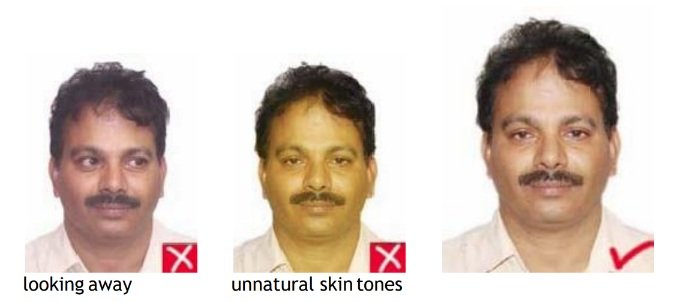
Head and Eyes – Position and Background
Face the camera straight on. Do not tilt or turn your head (avoid portrait-style angles).
Your face should be fully visible with both sides clearly shown.
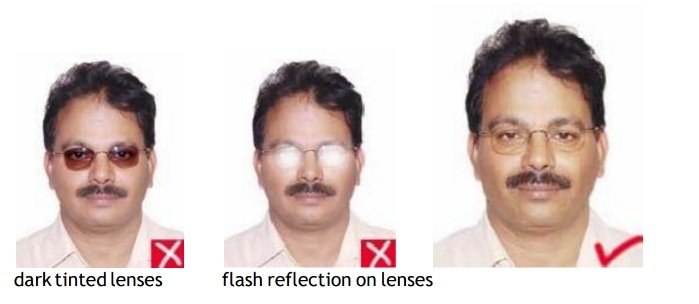
Your eyes must be open, level, and clearly visible. Ensure they are not covered by hair or eyeglass frames.
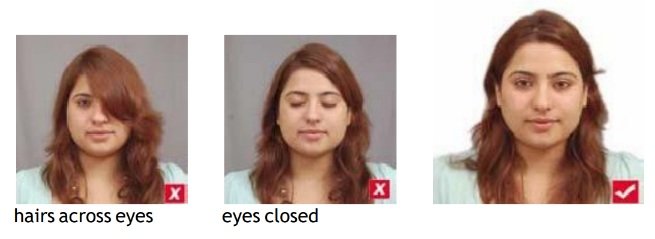
If you wear glasses, avoid glare by slightly tilting your head upward or downward.
Do not wear dark or tinted glasses.
Exposure and Lighting
Make sure the photo is neither overexposed nor underexposed. Both will result in a poor and unusable image.
Use balanced, even lighting so that your facial features are clearly visible.
Avoid shadows on your face and the background. Soft, diffused lighting (like from umbrella lights) works best.
Note: Always follow the official photo and signature guidelines provided by the authority.
FAQs
Can I upload any photo?
Yes, but for best results use a straight-on headshot with a plain background. The tool will crop and align the face if you enable auto-crop.
Which image format is best - JPEG or PNG?
Use JPEG for photos (smaller file size) and PNG for signatures (preserves sharp edges and transparency).
Can the tool reduce file size without big quality loss?
Yes - the tool uses smart compression to reach your target KB while preserving visible quality; you can preview before download.
What if my required file size is very small (e.g., ≤ 40 KB)?
Try a slightly lower pixel dimension, increase compression, or crop tighter around the head; be careful not to violate passport framing rules.
Do you guarantee acceptance by passport/visa authorities?
We provide tools to match size, dimensions, and file-size rules, but final acceptance depends on the issuing authority’s photo guidelines. Always verify official requirements before submission.